
What is Edit Order by Customer?
The Edit Order by Customer for WooCommerce is a specialized premium extension designed to enhance the post-purchase flexibility for customers using the WooCommerce platform. Developed by Addify and available on the official WooCommerce Marketplace, this plugin addresses a common pain point in e-commerce: the inability for customers to easily correct mistakes or modify details in orders they’ve already placed. Its core purpose is to empower customers to make specific changes to their orders, but only under conditions strictly defined by the store administrator. This controlled flexibility significantly reduces the need for manual intervention from support staff, saving time and minimizing potential human errors during order adjustments. The significance of this plugin lies in its ability to balance customer convenience with operational control. By allowing edits based on specific order statuses (like ‘Pending Payment’ or ‘On-Hold’) and user roles, businesses can offer enhanced customer service without compromising their fulfillment workflow or incurring unexpected costs, such as altered shipping fees. This is particularly beneficial for stores dealing with complex orders, B2B transactions where adjustments are frequent, or any business looking to improve customer satisfaction by providing a more forgiving and user-friendly post-order experience. It transforms a typically rigid process into a more dynamic interaction, fostering customer loyalty and streamlining operations simultaneously.
Key Features of Edit Order by Customer
The Edit Order by Customer plugin offers a robust set of features meticulously designed to provide controlled order modification capabilities to WooCommerce store customers. Its primary strength lies in the configurable permissions system, allowing administrators unparalleled control over the editing process. Here’s a look at the core functionalities:
- Conditional Editing Based on Order Status: Admins can specify which order statuses (e.g., ‘Pending Payment’, ‘On-Hold’) permit customer edits. This prevents changes to orders already processed or shipped.
- User Role Restrictions: Editing privileges can be assigned based on WordPress user roles. This allows businesses to offer more flexibility to specific customer groups, like wholesalers or registered members, while restricting guest users.
- Editable Field Control: The plugin allows granular control over which parts of an order can be changed. Customers can potentially edit billing addresses, shipping addresses, selected products (add/remove items, typically limited to pending/on-hold statuses), chosen payment methods, and selected shipping methods, all subject to admin configuration.
- Selective Field Editing within Addresses: Admins can further restrict address editing by making only certain fields modifiable (e.g., allow street address change but prevent changes to city, zip code, or country to avoid unexpected shipping cost variations).
- Admin Notifications: Automatic email notifications are sent to the store admin(s) whenever a customer successfully edits an order. These notifications detail the changes made, ensuring administrators are promptly informed.
- Automatic Status Change Post-Edit: Upon customer modification, the order status is automatically changed to ‘On-Hold’. This crucial step flags the order for admin review before proceeding with fulfillment, ensuring all changes are appropriate and accounted for.
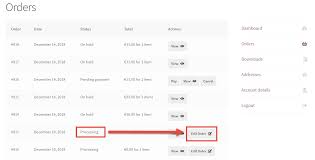
- Frontend Integration: Customers access the editing feature directly from their ‘My Account’ page, where an ‘Edit Order’ button appears next to eligible orders within the order history grid.
- Product Addition/Deletion Interface: When product editing is enabled, customers use a simple popup interface to search, add, or remove items from their order, recalculating the total dynamically.
The latest version, 1.1.2, ensures compatibility with recent WooCommerce and WordPress updates, maintaining stability and security. While the active installation count of 200+ might seem modest, it reflects its status as a premium, niche solution targeting specific business needs within the larger WooCommerce ecosystem.
Why Choose Edit Order by Customer in 2024?
In the competitive e-commerce landscape of 2024, customer experience is paramount. Edit Order by Customer offers a distinct advantage by directly addressing post-purchase friction. Allowing customers self-service options for order corrections significantly enhances satisfaction. Instead of navigating support channels for simple mistakes like incorrect addresses or quantity errors, customers can resolve issues instantly, provided the order status permits. This immediate resolution capability not only saves the customer time but also reduces the burden on support teams. Fewer support tickets related to order modifications mean administrators and staff can focus on more complex issues, improving overall operational efficiency. The plugin’s granular control remains a key selling point. Businesses aren’t forced into an all-or-nothing approach; they can precisely define *who* can edit, *what* they can edit, and *when*. This level of control is crucial for managing costs, especially shipping, and ensuring edits don’t disrupt established fulfillment processes. For B2B stores, where large orders are common and prone to adjustments before finalization, this plugin provides essential flexibility, mirroring offline purchasing workflows. Furthermore, by automating the status change to ‘On-Hold’ after an edit, it ensures administrative oversight before any potentially altered order proceeds. This safety net prevents errors from slipping through. Compared to manual editing by staff, which is time-consuming and error-prone, this extension offers a streamlined, reliable, and customer-centric solution. Investing in such a tool demonstrates a commitment to customer convenience and operational excellence, potentially improving customer loyalty and reducing operational overhead – a smart choice for many WooCommerce stores this year.
- Enhanced Customer Satisfaction: Provides flexibility and reduces frustration for customers needing to correct order details.
- Reduced Administrative Workload: Automates order adjustments, decreasing manual intervention and support ticket volume. Read more on customer service best practices to understand the impact.
- Granular Control: Fine-tuned settings based on order status, user roles, and specific editable fields offer robust control.
- Improved Order Accuracy: Catches potential errors before fulfillment by placing edited orders on hold for review.
- B2B Suitability: Especially valuable for business-to-business transactions where order adjustments are common practice.
How to Download Edit Order by Customer
Edit Order by Customer is a premium extension available exclusively through the official WooCommerce Marketplace. Unlike free plugins from the WordPress.org repository, it requires purchase. Here’s how to acquire it:
1. Navigate to the Product Page:
- Go to the official Edit Order by Customer page on WooCommerce.com.
- Review the features, documentation links, and pricing options presented.
2. Select a Billing Plan:
- Choose between the available subscription plans (typically 1-year or 2-year options). The longer plan usually offers a discount.
- Click the “Buy Now” or “Add to Cart” button corresponding to your chosen plan.
3. Complete the Purchase & Download:
- Proceed to the checkout. You may need to log in to your WooCommerce.com account or create one.
- Enter your payment details and complete the transaction.
- Once purchased, navigate to your WooCommerce.com account dashboard. Under the ‘Downloads’ section, you will find the plugin’s ZIP file ready for download. Download this file to your computer.
For a hassle-free setup and optimized performance for your WooCommerce store, consider reliable managed hosting providers. Platforms like WPX Hosting often provide environments pre-configured for WordPress and WooCommerce, simplifying the initial stages of getting your store online and ensuring plugins like Edit Order by Customer run smoothly.
Installing Edit Order by Customer: Step-by-Step Guide
Once you have purchased and downloaded the Edit Order by Customer plugin ZIP file from your WooCommerce.com account, installing it on your WordPress site follows the standard procedure for premium plugins. Ensure you have administrator privileges on your WordPress dashboard. Here’s a step-by-step guide:
1. Access Your WordPress Dashboard:
- Log in to your website’s WordPress admin area (typically found at `yourdomain.com/wp-admin`).
- Ensure your WordPress, WooCommerce, and PHP versions meet the minimum requirements stated on the plugin page (WP 4.6+, WC 3.0.0+, PHP 5.2+).
2. Upload the Plugin File:
- In the left-hand sidebar, navigate to Plugins > Add New.
- At the top of the ‘Add Plugins’ page, click the Upload Plugin button.
- Click the Choose File button, locate the `edit-order-by-customer-for-woocommerce.zip` file (or similar name) you downloaded from WooCommerce.com, and select it.
- Click the Install Now button. WordPress will upload and unpack the plugin files.
3. Activate the Plugin:
- After the installation completes successfully, you will see a confirmation message. Click the Activate Plugin button.
- Once activated, you should find the plugin’s settings menu under WooCommerce > Settings > Edit Order (or a similar location, check the official documentation for the exact path).
- Configure the settings according to your business needs, defining which statuses, roles, and fields are editable.
Note: Always back up your website before installing or activating new plugins, especially those that interact heavily with core functions like WooCommerce orders. After activation, carefully review the plugin settings and test the editing functionality from a customer account perspective to ensure it behaves as expected based on your configuration.
Edit Order by Customer Pricing
Edit Order by Customer for WooCommerce is a premium extension, requiring an annual subscription for ongoing updates and support. The pricing is structured to provide options for different commitment levels:
| Component | Price (USD) | Details |
|---|---|---|
| 1-Year Plan | $49 | Provides access to the plugin, 1 year of product updates, 1 year of customer support via WooCommerce.com, and a 30-day money-back guarantee. Requires manual renewal after one year to continue receiving updates and support. |
| 2-Year Plan | $78.40 | Offers a 20% discount compared to the annual plan ($39.20/year). Includes 2 years of product updates, 2 years of customer support, and the 30-day money-back guarantee. Provides longer-term value and fewer renewal hassles. |
The subscription model ensures the plugin remains compatible with the latest versions of WordPress and WooCommerce and receives ongoing development for features and security. Consider the potential time saved in manual order adjustments and the boost in customer satisfaction when evaluating the cost.
Edit Order by Customer Alternatives
While Edit Order by Customer by Addify is a focused solution, other plugins and methods exist for managing order modifications in WooCommerce, each with different approaches and features:
1. Manual Editing by Admin:
- Pros: No additional cost (built into WooCommerce Core). Full control by the administrator.
- Cons: Time-consuming for staff, requires customer contact via email/phone, prone to manual errors, doesn’t empower the customer directly, often slower resolution.
- Best For: Stores with very low volume of order edits, or where strict admin oversight on every change is mandatory.
2. YITH WooCommerce Request a Quote:
- Pros: Excellent for B2B or custom pricing scenarios, allows negotiation and adjustment *before* an order is finalized. Offers robust quote management features.
- Cons: Primarily focused on the pre-order quote process, not designed for editing orders *after* they’ve been placed and potentially paid for. Different use case than Edit Order by Customer.
- Best For: Businesses that rely heavily on custom quotes and pricing negotiations rather than standard checkout.
3. Other Third-Party Order Editing Plugins (e.g., from CodeCanyon or independent developers):
- Pros: Might offer different feature sets or pricing models (sometimes one-time fees). Can provide competition and choice.
- Cons: Support quality and update frequency can vary significantly. Compatibility with other plugins or themes might be less guaranteed compared to official WooCommerce extensions. May lack the granular status/role-based controls.
- Best For: Users willing to research and potentially take more risk for a specific feature or pricing structure not offered by the official marketplace option. Thoroughly vet reviews and support responsiveness.
Edit Order by Customer stands out for its direct integration with the post-order process, conditional logic based on status/role, and the backing of the official WooCommerce marketplace support structure.
Edit Order by Customer vs. Other Plugins
When comparing Edit Order by Customer to other methods or plugins for handling WooCommerce order modifications, its specific focus and implementation offer distinct advantages, particularly against relying solely on manual admin edits or potentially less integrated third-party solutions. The core difference lies in empowering the customer directly while maintaining structured administrative control.
- Direct Customer Empowerment vs. Admin Bottleneck: Unlike manual editing, which requires customer outreach and admin action for every minor change, this plugin provides a self-service portal. Customers can make approved changes instantly, leading to faster resolution and higher satisfaction, contrasting sharply with the delays inherent in manual processes.
- Granular Control vs. Basic Functionality: While some simpler plugins might allow editing, Edit Order by Customer excels with its condition-based rules (order status, user role). This prevents unwanted edits (e.g., changing shipping on a shipped order) and allows tailored experiences (e.g., more freedom for VIP customers), a level of sophistication often missing in basic alternatives or core WooCommerce.
- Integrated Workflow vs. Disjointed Processes: The plugin seamlessly integrates into the ‘My Account’ page and automatically updates order status to ‘On-Hold’ for review. This creates a smooth, trackable workflow. Manual methods lack this integration, increasing the risk of oversight or communication errors. Alternatives might not integrate as cleanly with WooCommerce standards. See how this compares to managing WooCommerce Product Addons, where integration is also key.
- Official Marketplace Assurance vs. Variable Support: Being sold on WooCommerce.com provides a level of assurance regarding coding standards, security checks (like the noted vulnerability checks passed), and access to reliable support via the WooCommerce.com ticketing system. Support and update reliability for plugins from other marketplaces or developers can be less predictable.
Essentially, Edit Order by Customer offers a purpose-built solution that balances flexibility for the customer with necessary controls for the business. It’s designed specifically for post-purchase edits within a controlled framework, distinguishing it from quote systems or the inherent inefficiency and risk of purely manual adjustments.
Tips for Using Edit Order by Customer Effectively
To maximize the benefits of the Edit Order by Customer plugin and ensure a smooth experience for both customers and administrators, consider these practical tips:
- Configure Thoughtfully: Don’t enable every option by default. Carefully decide which order statuses genuinely warrant editing (e.g., ‘Pending Payment’, ‘On-Hold’ are common). Avoid allowing edits on ‘Processing’ or ‘Completed’ orders unless you have a specific workflow to handle fulfillment reversals.
- Leverage User Roles: Use role-based permissions strategically. You might grant broader editing rights to trusted wholesale or B2B customers while limiting options for standard retail customers or guests.
- Restrict Critical Fields: Pay close attention to address field restrictions. Preventing changes to country, state, or zip code after initial calculation can stop customers from inadvertently changing shipping costs after the fact. Only allow edits to fields like apartment number or C/O name if needed. Configure product editing carefully, as changing items drastically alters the order.
- Communicate Clearly to Customers: Inform customers about the editing possibility. Add a note on the order confirmation page/email or within their ‘My Account’ section explaining which orders might be editable and for how long (implicitly defined by the allowed statuses). This manages expectations.
- Monitor Admin Notifications: Ensure the admin email notifications are correctly configured and monitored. Promptly review orders placed ‘On-Hold’ after customer edits to approve or address any issues before proceeding with fulfillment.
- Test Thoroughly: After configuring the settings, create test orders under different scenarios (various statuses, different user roles) and attempt edits as a customer would. Verify that restrictions work as expected and the workflow is logical.
- Document Internal Procedures: Ensure your team understands how edited orders are flagged (‘On-Hold’ status) and the process for reviewing and finalizing these orders.
- Consult Official Documentation: Refer to the plugin’s official documentation for detailed explanations of each setting and potential interactions.
Pairing Edit Order by Customer with Other WooCommerce Tools
Edit Order by Customer functions effectively on its own but can become even more powerful when strategically combined with other WooCommerce extensions and tools to create a comprehensive customer management and order processing system. Its core functionality revolves around post-purchase modification, which naturally interfaces with several other aspects of the e-commerce workflow. For instance, pairing it with advanced customer account plugins like Ultimate Member or similar solutions allows for more sophisticated user role management, which Edit Order by Customer can leverage for its permission settings. If you define custom roles for different customer tiers (e.g., Gold, Silver, Bronze Members), you can assign distinct order editing capabilities to each tier, enhancing the value of your membership program. Furthermore, integrating with Customer Relationship Management (CRM) systems (via dedicated WooCommerce CRM plugins) ensures that any customer-initiated order edits are logged within the customer’s overall profile and history. This provides support agents with a complete picture of customer interactions, including self-serve modifications. When combined with sophisticated shipping plugins, careful configuration is needed to ensure that address edits allowed by Edit Order by Customer do not conflict with complex shipping rate calculations or zone restrictions managed by the shipping extension. Similarly, if using plugins that offer advanced checkout modifications or custom fields, ensure that any custom data collected during checkout is handled appropriately if the order is later edited by the customer. The key is to view Edit Order by Customer not just in isolation, but as a component that enhances flexibility within the broader ecosystem of your WooCommerce store’s operational tools.
Should You Invest in Edit Order by Customer?
Deciding whether to invest $49 or more annually in the Edit Order by Customer extension depends largely on your specific business needs, order volume, and customer base. While core WooCommerce allows admin editing, this premium plugin offers unique value by shifting some of that capability directly to the customer under controlled conditions. Consider investing if your store experiences frequent requests from customers to correct addresses, adjust quantities, or swap items shortly after placing an order. Manually handling these requests consumes significant administrative time and introduces potential errors. This plugin can directly reduce that workload, potentially offering a return on investment through saved labor costs alone. It’s particularly valuable for businesses with a significant B2B segment, where modifying draft or pending orders is a standard part of the workflow. Providing B2B clients with self-service editing mirrors expectations from traditional procurement processes. Furthermore, if enhancing customer experience and reducing post-purchase friction are strategic priorities, this extension contributes directly to those goals by offering convenience and autonomy. However, if your store has very few order modification requests, if your products or fulfillment process are too complex to allow easy changes (e.g., highly customized items), or if your budget is extremely tight, the cost might not be justified. Evaluate the frequency of current manual edits and the potential time savings. If the $49/year cost is offset by saving even a few hours of administrative work per month or by preventing costly shipping errors due to incorrect addresses, the investment is likely worthwhile. It boils down to weighing the subscription cost against the tangible benefits of operational efficiency and improved customer satisfaction.
- High Volume of Correction Requests: If support staff spend significant time on minor order fixes.
- B2B Focus: If catering to business clients who expect order flexibility before finalization.
- Customer Experience Priority: If aiming to provide maximum convenience and self-service options.
- Operational Efficiency Goals: If seeking to automate processes and reduce manual administrative tasks.
Visit the official WooCommerce Marketplace page for current pricing and to make your purchase if it aligns with your needs.
Frequently Asked Questions:
Can customers edit orders with any status using Edit Order by Customer?
No, administrators configure exactly which order statuses (e.g., ‘Pending payment’, ‘On hold’) allow customer edits. Edits are typically disabled for processed or shipped orders like ‘Processing’ or ‘Completed’.
Can customers change the products in their order with this plugin?
Yes, if the administrator enables product editing. This feature is usually restricted to specific order statuses like ‘Pending payment’ or ‘On hold’. Customers can add or remove items, and the order total recalculates.
Does the store admin get notified when a customer edits an order?
Yes, the plugin includes configurable email notifications that automatically alert designated administrators when a customer submits changes to an order.
Can I prevent customers from changing their shipping country or zip code?
Yes, the plugin allows granular control over which address fields are editable. You can disable editing for specific fields like country, state, city, or zip code to prevent changes that would affect shipping costs or validity.
Is Edit Order by Customer compatible with custom user roles?
Yes, editing permissions can be configured based on standard WordPress user roles as well as custom roles created by other plugins, allowing different editing capabilities for various customer groups.
What happens to the order status after a customer saves their edits?
By default, after a customer submits their edits, the order status automatically changes to ‘On hold’. This ensures an administrator reviews the modifications before the order proceeds further in the fulfillment process.
Conclusion
The Edit Order by Customer for WooCommerce extension by Addify offers a targeted and effective solution for a common e-commerce challenge: managing post-purchase order modifications. By intelligently empowering customers to make controlled changes to their orders based on status and user role, it significantly enhances the user experience, reduces administrative burden, and minimizes errors associated with manual adjustments. Its granular control features ensure businesses retain oversight, preventing unwanted changes that could impact costs or logistics, particularly through customizable field restrictions and the automatic ‘On-Hold’ status trigger post-edit. While it represents an annual investment, the potential savings in support time, reduction in shipping errors, and boost in customer satisfaction can provide substantial value, especially for B2B stores or businesses experiencing a high volume of modification requests. For WooCommerce stores looking to streamline operations and offer greater flexibility within a secure framework, Edit Order by Customer presents a compelling option. It transforms a potential point of friction into an opportunity for improved service and efficiency. Consider evaluating your store’s specific needs against its capabilities to determine if this premium extension is the right fit for enhancing your order management workflow in 2024 and beyond.
Disclaimer: Plugin features, pricing, and compatibility details are subject to change. Always refer to the official WooCommerce Marketplace product page and documentation for the most current information before purchasing or installing.

.png "Sell Media Model Release Addon")