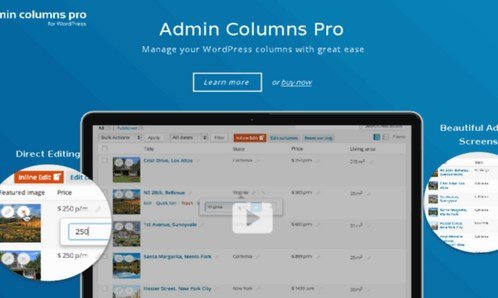
What is Admin Columns Pro WooCommerce Addon?
When WordPress store managers need to efficiently handle hundreds or thousands of products, orders, and customers, Admin Columns Pro WooCommerce Addon offers a revolutionary approach to WooCommerce data management. This powerful extension transforms your default WooCommerce tables into fully customizable, feature-rich dashboards that put you in complete control of your e-commerce operations.
What Makes Admin Columns Pro WooCommerce Addon Different
Unlike standard WooCommerce interfaces that show limited information and require multiple clicks to access essential data, Admin Columns Pro WooCommerce Addon brings everything you need to a single, customizable screen. It’s designed specifically for WooCommerce power users who need to manage large inventories, process orders efficiently, and gain deep customer insights without wasting time navigating through different admin pages.
- Complete customization of WooCommerce admin tables
- Smart filtering and sorting on any product or order attribute
- Inline and bulk editing capabilities for rapid updates
Admin Columns Pro WooCommerce Addon Features for WordPress Users
Advanced Product Management
The Admin Columns Pro WooCommerce Addon revolutionizes how you manage your product catalog. Display any product information you need directly in the products overview – from basic details like SKU and stock status to complex data like product attributes, dimensions, and custom fields. The smart filtering system allows you to create segments like “Low stock items,” “High turnover products,” or “Products without images” with just a few clicks. Save these filtered views for quick access and share them with team members. The inline editing feature lets you update product information without ever leaving the overview page, dramatically reducing the time spent on inventory management.
Price and Sale Management Wizards
Managing pricing across hundreds of products becomes effortless with the specialized wizards included in Admin Columns Pro WooCommerce Addon. The Price Update Wizard lets you increase, decrease, or set new prices across selected products using either percentage-based or fixed-value calculations. Perfect for seasonal adjustments or supplier cost changes. The Sale Wizard is equally powerful for running promotions – set sale prices based on regular prices, schedule sales in advance, and clear all sale prices with one click when the promotion ends. These tools can save hours of manual work and ensure pricing consistency across your entire catalog.
Order Processing Excellence
Streamline your order fulfillment workflow with comprehensive order management features. Filter orders by any property including customer details, payment status, shipping method, or custom order meta. View and update order notes directly from the overview, making customer communication seamless. The bulk editing capabilities allow you to update multiple orders simultaneously – perfect for changing shipping statuses, adding tracking numbers, or updating payment information. Create custom order views tailored to different team members or workflows – your fulfillment team might need different columns than your customer service team.
How to Install Admin Columns Pro WooCommerce Addon
Quick Installation
- First, install and activate Admin Columns Pro from our premium plugins collection
- Download the WooCommerce Addon from your Admin Columns account
- Go to Plugins → Add New → Upload Plugin in WordPress dashboard
- Select the downloaded file and Install Now → Activate
Who Should Use Admin Columns Pro WooCommerce Addon?
E-commerce Store Managers
If you’re managing a WooCommerce store with more than 100 products, this addon is essential. You’ll save hours weekly by updating products directly from the overview, quickly finding orders that need attention, and managing customer data efficiently. Perfect for daily operations where speed and accuracy matter.
Digital Agency Professionals
Agencies managing multiple client stores will love the consistency and efficiency this brings. Create standardized column sets and workflows that can be applied across different client sites. The bulk editing features are invaluable for seasonal updates, inventory adjustments, and promotional campaigns across multiple stores.
Admin Columns Pro WooCommerce Addon vs Alternatives
| Feature | Admin Columns Pro WooCommerce Addon | Default WooCommerce |
|---|---|---|
| Custom Columns | Unlimited custom columns for any data | Limited to default columns only |
| Bulk Editing | Advanced bulk editing with wizards | Basic bulk edit with limited fields |
| Smart Filtering | Filter on any field including custom data | Basic filters on standard fields only |
Admin Columns Pro WooCommerce Addon Pricing
The WooCommerce Addon requires Admin Columns Pro and offers three licensing options. Single license at €79 for 1 site, perfect for individual store owners. Business license at €149 covers 5 sites, ideal for small agencies or multiple stores. Agency license at €279 provides unlimited sites usage for large agencies and developers. All licenses include 1 year of premium support and updates with a 30-day money-back guarantee.
Pros and Cons
✅ Pros
- Dramatically reduces time spent on store management
- Highly customizable to match specific workflows
- Excellent for large inventories and high-volume stores
❌ Cons
- Requires Admin Columns Pro base plugin (additional cost)
- Learning curve for advanced features
- May be overkill for stores with very few products
Frequently Asked Questions
Does Admin Columns Pro WooCommerce Addon work with product variations?
Yes, the addon fully supports WooCommerce product variations. You can display variation-specific data, filter by variation attributes, and bulk edit variation prices, stock, and other properties directly from the products overview.
Can I export filtered data from WooCommerce tables?
Absolutely! Admin Columns Pro WooCommerce Addon includes powerful export functionality. You can apply filters to select specific products, orders, or customers, then export the results to CSV for further analysis or importing into other systems.
Is the addon compatible with WooCommerce subscription plugins?
Yes, the addon integrates seamlessly with most popular WooCommerce extensions including WooCommerce Subscriptions, Memberships, and Bookings. You can display subscription-related data and manage subscription products efficiently.
How does the Price Update Wizard handle tax calculations?
The Price Update Wizard updates base prices before tax. Your WooCommerce tax settings will automatically apply to the updated prices. You can choose between percentage-based or fixed-value updates with optional rounding for clean pricing.
Can different user roles see different column sets?
Yes, Admin Columns Pro WooCommerce Addon supports role-based column sets. You can create specific views for administrators, managers, and other user roles, ensuring each team member sees only the relevant data for their responsibilities.
Does the addon work with WordPress multisite installations?
The Business and Agency licenses support multisite installations. You can manage column sets and settings across multiple sites in your network, though each site can have its own customized configuration.
Final Verdict
Admin Columns Pro WooCommerce Addon is an indispensable tool for serious WooCommerce store owners and agencies managing multiple e-commerce sites. The time savings alone justify the investment, with users reporting hours saved weekly on routine management tasks. It’s particularly well-suited for stores with large product catalogs, high order volumes, or complex inventory management needs. While there’s a learning curve to unlock its full potential, the productivity gains make it a must-have extension for anyone serious about efficient WooCommerce management.