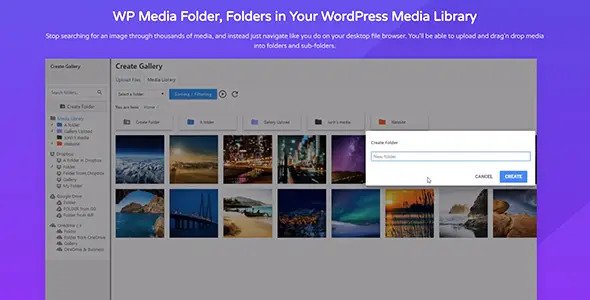
WP Media Folder Addons is a collection of professional extensions for the core media management plugin, enabling deep integration with cloud storage providers and advanced gallery layouts. With over 75,000 members using JoomUnited products, these addons transform the standard WordPress library into a synchronized digital asset management system. It provides the necessary bridges to offload local storage to high-performance cloud networks.
WPExclusive members get access to Media Folder Addons as part of a full plugin and theme library — plans from $9.99/month. See the full JoomUnited collection →
What Is WP Media Folder Addons?
WP Media Folder Addons is developed by JoomUnited and is an administration plugin for WordPress. It expands the capabilities of the base media manager by adding professional-grade tools like cloud connectors, a dedicated gallery manager, and PDF embedding features. It belongs to the administration category on WPExclusive, alongside other tools for file management and site organization.
The plugin solves the problem of local server bloat and disorganized media workflows by synchronizing your website with external storage services. It is designed for creative agencies, photographers, and high-traffic sites that need to manage thousands of assets across multiple platforms.
WP Media Folder Addons Features
The feature set is built around providing seamless connectivity between WordPress and external cloud environments while improving the front-end presentation of files.
Cloud Storage Connectors
Media Folder Addons includes integrations for Google Drive, Dropbox, OneDrive, and Amazon S3. These connectors offer two-way instant synchronization, meaning changes made in the cloud reflected in WordPress and vice versa. You can also offload files to Google Cloud, DigitalOcean, Wasabi, Linode, and Vultr Storage to improve site performance and reduce hosting costs. This level of administration control ensures your media is always backed up and accessible.
Professional Gallery Manager
The included Gallery Addon brings a sophisticated manager that works directly with your existing media folders. It features themes such as Masonry, Portfolio, Slider, Flow slide, and Square grid to display images professionally. Users can automatically create galleries from entire folders, saving hours of manual selection time. The Photographer addon specifically caters to visual professionals who need simple yet elegant display options.
AI-Powered Metadata Generation
The plugin uses AI tools to automatically generate titles, alt text, descriptions, and captions for images upon upload. This metadata generation is vital for accessibility and SEO, removing the need for manual data entry. It ensures every file in your library is searchable and optimized for search engine crawlers without user intervention.
PDF Embedding and Download Management
Advanced PDF handling allows users to embed documents directly into pages or create styled download buttons for ZIP and PDF files. You can customize the colors and design of these buttons to match your brand identity across the entire site. This feature is particularly useful for membership sites or developer documentation portals.
Pricing
Check current pricing on the Media Folder Addons sales page — WPExclusive members access it as part of their plan.
| Plan | Price | Sites | Includes |
|---|---|---|---|
| Plugin Only | $49 | Unlimited | Base features + 1 Year Support |
| Plugin + Addons | $69 | Unlimited | Cloud, Gallery, and PDF Addons |
| WPExclusive Membership | From $9.99/month | Unlimited | Media Folder Addons + full library |
For developers managing multiple sites, a WPExclusive membership covers Media Folder Addons plus hundreds of other plugins and themes — usually less than one premium license.
Latest Version
The plugin receives regular updates to maintain compatibility with cloud provider API changes and new WordPress releases. WPExclusive updates plugin files promptly after each release to ensure your site remains secure and functional.
How to Install
- Download the Media Folder Addons .zip from your WPExclusive member account
- In WordPress: Plugins → Add New → Upload Plugin
- Select the .zip and click Install Now → Activate
- Navigate to the Media Folder settings to connect your chosen cloud service
- Set up your synchronization tasks to begin importing or offloading files
Use Cases
Large Scale E-commerce Sites
Store thousands of product images on Amazon S3 while managing them within the native WordPress interface using this ecommerce integration.
Photography Portfolios
Quickly organize shoots into folders and generate professional Masonry or Slider galleries automatically without manual image selection.
Collaborative Content Teams
Sync a shared Dropbox or Google Drive folder with WordPress so that designers can upload assets directly to the cloud and have them appear in the media library for editors.
Agencies and Developers Managing Multiple Client Sites
Maintain consistent media organization across all client projects. Using WPExclusive allows agencies to deploy these premium organization tools across an unlimited number of sites without individual license overhead.
vs Alternatives
| Feature | Media Folder Addons | Wicked Folders | Happy Files PRO |
|---|---|---|---|
| Cloud Sync | ✅ Yes (Google/Dropbox/S3) | ❌ No | ❌ No |
| AI Metadata | ✅ Yes | ❌ No | ❌ No |
| Watermarking | ✅ Yes | ❌ No | ❌ No |
| Starting Price | $69 | $49 | $59 |
| Available on WPExclusive | ✅ Yes | ❌ | ❌ |
Browse the full administration plugins on WPExclusive →
Pros and Cons
✅ Strengths
- Deep synchronization with major cloud providers including Google Drive and OneDrive
- AI-driven optimization for SEO-ready alt text and descriptions
- Offloading capabilities to reduce server storage and improve load times
- Full compatibility with builders like Elementor, Divi, and Gutenberg
⚠️ Limitations
- Requires the base WP Media Folder plugin to function effectively
- AI processing credits are typically managed via external quotas
- Developer auto-updates require an active license key. WPExclusive publishes updates manually when new versions are released.
Is WP Media Folder Addons GPL Licensed?
Yes. WP Media Folder Addons is distributed under the GNU General Public License (GPL) — the same license that governs WordPress itself. GPL gives any user the legal right to use, study, share, and redistribute the software. This is the legal framework that makes WPExclusive’s membership model possible.
WPExclusive distributes 100% original, unmodified files — the same release the developer publishes. No injected code, no alterations, no security risks.
Get WP Media Folder Addons on WPExclusive
WPExclusive membership starts at $9.99/month, $87/year, or $149 lifetime — giving you WP Media Folder Addons plus every plugin and theme in the library, on unlimited sites.
Explore the full JoomUnited collection → or browse all WordPress plugins →
Frequently Asked Questions
What does WP Media Folder Addons do?
WP Media Folder Addons is an extension pack that adds cloud synchronization, advanced gallery themes, and PDF embedding to the WordPress media library. Media Folder Addons allows users to connect their site to Google Drive, Dropbox, and OneDrive for automated file management.
Is WP Media Folder Addons free?
This is a premium set of addons. While JoomUnited may offer limited versions of some tools, the full addon suite is available via WPExclusive in plans starting from $9.99/month.
What is the latest version of WP Media Folder Addons?
The plugin is actively maintained — WPExclusive members always receive the most current release as soon as JoomUnited pushes a stable update.
How much does WP Media Folder Addons cost?
The retail price for the plugin + addons bundle is approximately $69 per year. Via WPExclusive, it is included in plans from $9.99/month covering unlimited site installations.
Is it legal to use WP Media Folder Addons via WPExclusive?
The plugin is GPL licensed, which explicitly permits redistribution. WPExclusive provides original, unmodified files — fully within GPL terms.
How does the cloud sync work in Media Folder Addons?
Media Folder Addons establishes a secure API connection between your WordPress site and providers like Google Drive. It allows for two-way synchronization, meaning any file added to the cloud folder appears in WordPress automatically.